Harmony
Build and audition a harmony
Create a progression, organize it into sections, and hear every harmonic event in context.
Goal
A Harmony is a timed sequence of KeyScales. It can represent a short cadence, a complete progression, or the harmonic plan of a song.
Interface landmarks
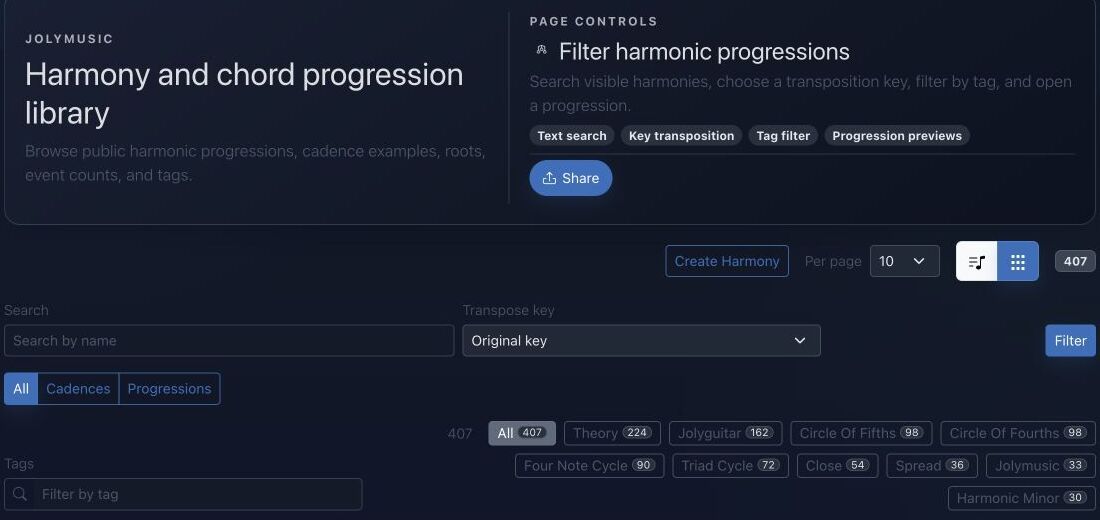
- Text search locates progressions by name.
- Key transposition previews the same relationships from another tonal center.
- Cadence and progression filters separate short functions from longer forms.
- Tags and view controls help move between catalog overview and detailed cards.
Step-by-step workflow
- Create a Harmony and choose its root context, visibility, and descriptive tags.
- Add sections to separate introductions, verses, choruses, bridges, or exercises.
- Insert harmonic events, choose their KeyScales, and set their duration and order.
- Audition the timeline, then reuse it in performances, play-alongs, generators, or integrations.
Practice tips
- Start with four events and verify the voice-leading before adding complexity.
- Use clear section names so the timeline remains understandable later.
Worked example
Example: create a ii–V–I practice loop
Create three events in C major: D minor seventh, G dominant seventh, and C major seventh. Give each one bar, loop the section, then transpose the whole Harmony to F and compare the retained interval functions.
Canonical project documentation
This reference is generated directly from repository Markdown; it is not duplicated fixture copy.
Source: Documentation/Harmony.md
1. Overview
Harmonies serve as the "logical layer" over musical notes. While a Note represents a specific performance event, a Harmony defines the rules of the musical space at a given time.
- Analytical Labeling: Provides text labels (e.g., "C Major", "Ab7#11") on the timeline.
- UI Highlighting: Determines which lanes in the Piano Roll are colored as "in-scale."
- Geometric Visualization: Drives the active nodes in the Circle of Fifths, Tonnetz, and Network views.
3. Workspace Integration
Harmonies are consumed by performances and workspace track containers as global timeline context. A single workspace can reference multiple harmonic palettes through HARMONY global events, and each event carries the active key/scale information used by theory tools.
Harmony Event Context
Harmony context is expressed as global events with timing metadata:
tick: The point where the harmonic context starts.durationTick: The active range of the harmony.label: The display label used by timeline and theory views.keyScale: The resolved key/scale payload used by note highlighting and visualization.
Workspace loaders merge these events into the global lane feed so the piano roll, instrument views, and graphical harmony surfaces read the same harmonic timeline.
6. Rendering Best Practices
6.1 Global Timeline (Harmony Lane)
Harmonies should be rendered as "pills" or segments on the global timeline. The label (e.g., "C Major") serves as the primary text. Tapping these pills should trigger a theory assistant or scale selector.
6.2 Contextual Zebra Shading
The Piano Roll background must adapt to the active Harmony.
- In-Scale: Vertical lanes corresponding to pitch classes found in
data.keyScale.tonesreceive a subtle highlight using the providedtoneColor. - Out-of-Scale: Lanes not in the set are rendered with a desaturated, darker background.
6.3 Native Highlighting
For native components (Fretboard/Keyboard), use the tones array to guide the user. Active scale degrees should be visually distinguished from non-scale tones to assist in "follow-along" modes.
6.4 WebView for Geometric Theory
Complex theory visualizations (Circle of Fifths, Tonnetz) should remain in the WebView layer to leverage existing coordinate-to-theory mapping logic. Use the JolyNativeBridge to sync the current workspace state to these views.
Quick troubleshooting
- Wrong chord in playback: inspect the KeyScale attached to that exact event, not only the Harmony root.
- Timeline order is confusing: use explicit section names and positions before adding more events.
- Transposition sounds unexpected: confirm whether spelling, absolute pitches, or functional degrees should remain fixed.
Before you finish
- Sections and events follow an intentional order.
- Every event has a duration and exact KeyScale.
- The complete timeline has been auditioned from start to finish.
Continue in JolyMusic
Open the related tool and apply this workflow immediately to one simple example.