Composition
Generate ideas with RunFormula
Turn a compact musical formula into audible lines inside a tone, KeyScale, instrument, or Harmony context.
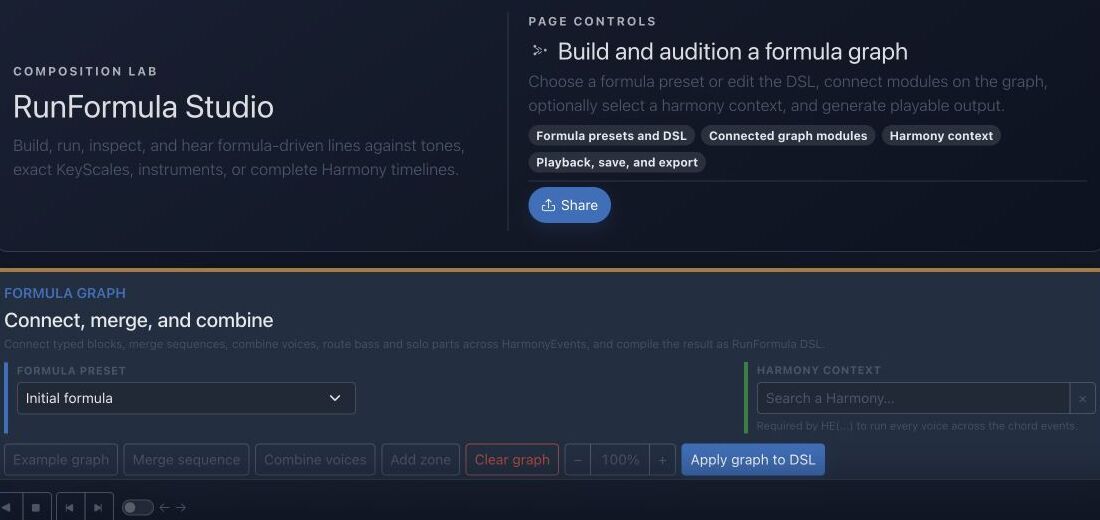
Goal
RunFormula describes repeatable melodic and rhythmic behavior. The studio lets you inspect every generated event before reusing the result.
Interface landmarks
- Formula preset supplies a known graph and DSL starting point.
- Graph modules expose generation stages and their connections.
- Harmony context decides which tones are valid at each point in time.
- Playback, save, and export actions turn a generated result into reusable material.
Step-by-step workflow
- Start from a stored preset or enter a small custom formula.
- Choose the musical context: tones, one exact KeyScale, or a complete Harmony timeline.
- Select an instrument and output limits, then generate the result.
- Inspect and audition every event; simplify the formula if the musical intention is unclear.
Practice tips
- Add one operator at a time so you can hear its effect.
- Save strong results as reusable material instead of keeping accidental complexity.
Worked example
Example: generate a constrained ascending line
Choose a simple scale-run preset, set C major as the exact KeyScale, limit the output to eight events, and select an instrument. Generate, inspect every pitch and duration, then change one operator and compare the result.
Canonical project documentation
This reference is generated directly from repository Markdown; it is not duplicated fixture copy.
Source: Documentation/InstrumentedRunFormula.md
Quick Reference
1 2 3 5 / +1 @16Plays current-KeyScale degrees 1 2 3 5, repeats the pattern, moves the next repetition up one KeyScale degree, and starts steps on a sixteenth-note grid.
R12(regen=pass;1=1;5=3;9=5) / 0 @16 P(8n.,16n,8n,16n)Creates a new twelve-tone row on every 12-note pass, fixes current-KeyScale degrees 1, 3, and 5 at row positions 1, 5, and 9, keeps every pitch class unique inside each row, and applies a repeating note-length pattern.
C:Ab:Dim7(e(1; d+1+s-1 t) 3 5 2):16n / 0 @16 T(*:2,4:1=[3,(F#4),((+3))]) H(d+2,s+7)Uses the closest A-flat diminished-seventh collection, a structured enclosure, beat-position targets, and two generated harmony voices.
1 1 1 1 / 0 @4 BASS(style=walking;pattern=1,3,5,7;approach=chromatic;target=1;range=E1..C4;anchor=E2;direction=closest;maxLeap=9;variation=cycle;voice=1) A(108,78,86,74)Builds a walking bass from chord roles, keeps it in bass register, and uses the final onset to approach the next HarmonyEvent's root when a next event exists.
Processing Order
The runtime applies the language in this order:
- split non-empty text lines into autonomous formula voices;
- extract
SEED(...)and initialize its deterministic random stream; - remove
T(...),H(...),P(...), and the advanced postfix operators for later application; - expand
R12(...),PAL(...), andCH(...)sources; - parse sources, groups, cells, enclosures, transformations, repetition movement, variation, and timing;
- generate base events while checking the selected instrument rows;
- apply
P(...), thenT(...), thenH(...); - apply advanced postfix operators in the exact order in which they were written;
- reject pitches outside the selected instrument rows and order the final events by onset and voice.
This ordering matters. For example, a T(...) rule matches the onset time after P(...) has retimed the performance, and H(...) harmonizes the final targeted pitch. SEED(...) is the one postfix operator with an early side effect: it seeds every random decision in the formula even when it is written last.
Graph Resolution Algorithm
Each item owns a stable nodeKey. Its connections.inputs list contains upstream node keys in semantic order. The compiler:
- indexes all items by
nodeKeyand rejects duplicates; - chooses
config.outputNodewhen present; - otherwise chooses the final item by
position, thennodeKey; - recursively compiles upstream
inputs; - rejects missing nodes and graph cycles;
- renders the current item type around or after its compiled input;
- stores the non-empty result in the formula projection.
Only join declares acceptsMany=true. Other input-capable types consume their first compiled data input. The state processor also validates dataInputs, timeInputs, and timelineInputs as known non-self references, but the server DSL compiler uses inputs for semantic compilation. Timeline connections and visual zones remain layout/documentation concerns.
Ordering has three distinct meanings:
RunFormula.positionorders preset badges inside a preset type;RunFormulaItem.positionprovides deterministic block ordering and the fallback output choice;- the order inside
connections.inputsdefines order for a multi-input join.
Formula Generates No Notes
Check in this order:
- the formula is not empty and contains at least one non-comment line;
- Note start is valid (
C,F#,Bb,F5); - the current KeyScale has resolvable tones;
- the selected instrument exposes MIDI row values;
- the first complete onset is inside the instrument's exact MIDI map;
- every member of a first bracket is playable;
- a
Ptoken is notr,?0, or repeatedly failing probability; - the chosen fixed note/interval is not outside the instrument.
Base voices stop at the first unplayable atomic step. Therefore one bad first bracket can make a valid-looking formula produce no base events.
Prefer Orthogonal Blocks
Good:
R12(regen=pass;1=1;5=3;9=5) / 0 @16 P(8n,16n) T(*:2,4:1=3) H(d+2)The row controls pitch-class inventory, timing controls the source grid, P controls duration, T controls metrical goals, and H controls added voices.
Avoid embedding several responsibilities in a raw block when typed blocks exist. Typed blocks allow admin/API validation, visual editing, preset diffs, and field-level evolution.
Quick troubleshooting
- No events are generated: verify graph connections, required fields, and output limits.
- Notes leave the intended harmony: confirm the chosen context and whether chromatic operators are enabled.
- The line is technically valid but unmusical: simplify rhythm, range, or targeting before adding modules.
Before you finish
- Every graph module has a specific musical purpose.
- Generated events stay inside the intended range and context.
- The result has been heard, inspected, and saved or discarded intentionally.
Continue in JolyMusic
Open the related tool and apply this workflow immediately to one simple example.