Composition
Générer des idées avec RunFormula
Transformez une formule musicale compacte en lignes audibles dans un contexte de notes, KeyScale, instrument ou Harmonie.
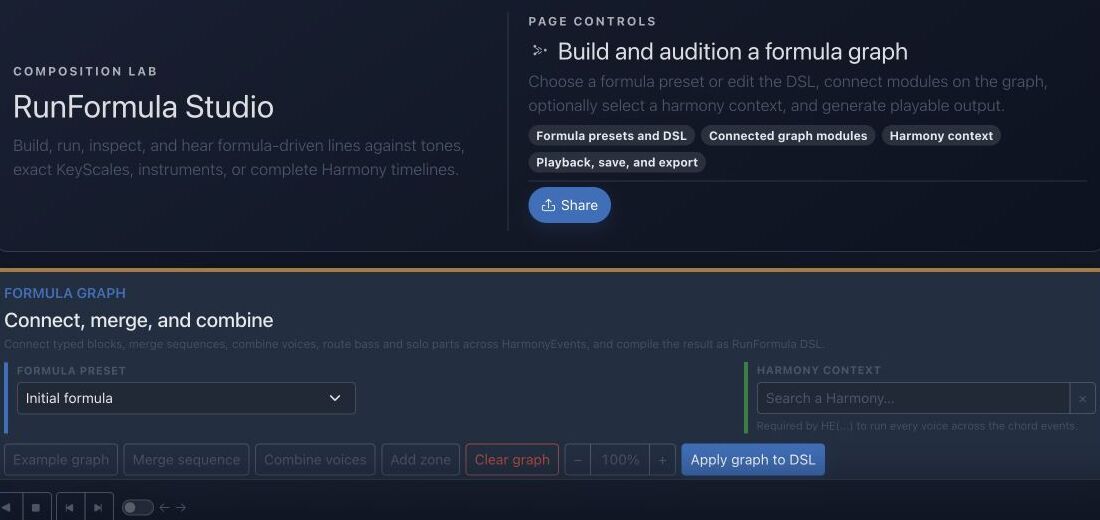
Objectif
RunFormula décrit un comportement mélodique et rythmique répétable. Le studio permet d’inspecter chaque événement généré avant sa réutilisation.
Repères dans l’interface
- Le preset fournit un graphe et un DSL connus comme point de départ.
- Les modules exposent les étapes de génération et leurs connexions.
- Le contexte d’Harmonie décide quelles notes sont valides à chaque instant.
- Lecture, sauvegarde et export transforment le résultat en matériau réutilisable.
Méthode pas à pas
- Partez d’un preset enregistré ou saisissez une petite formule personnalisée.
- Choisissez le contexte musical : notes, KeyScale exacte ou chronologie complète d’une Harmonie.
- Sélectionnez un instrument et les limites de sortie, puis lancez la génération.
- Inspectez et écoutez chaque événement ; simplifiez la formule si l’intention musicale manque de clarté.
Conseils de pratique
- Ajoutez un seul opérateur à la fois afin d’entendre son effet.
- Enregistrez les bons résultats comme matériau réutilisable plutôt que de conserver une complexité accidentelle.
Exemple guidé
Exemple : générer une ligne ascendante contrainte
Choisissez un preset de parcours de gamme, définissez Do majeur comme KeyScale exacte, limitez à huit événements et sélectionnez un instrument. Générez, inspectez hauteurs et durées puis modifiez un opérateur.
Documentation projet canonique
Cette référence est générée directement depuis les fichiers Markdown du dépôt ; elle n’est pas dupliquée dans les fixtures.
Source: Documentation/InstrumentedRunFormula.md
Quick Reference
1 2 3 5 / +1 @16Plays current-KeyScale degrees 1 2 3 5, repeats the pattern, moves the next repetition up one KeyScale degree, and starts steps on a sixteenth-note grid.
R12(regen=pass;1=1;5=3;9=5) / 0 @16 P(8n.,16n,8n,16n)Creates a new twelve-tone row on every 12-note pass, fixes current-KeyScale degrees 1, 3, and 5 at row positions 1, 5, and 9, keeps every pitch class unique inside each row, and applies a repeating note-length pattern.
C:Ab:Dim7(e(1; d+1+s-1 t) 3 5 2):16n / 0 @16 T(*:2,4:1=[3,(F#4),((+3))]) H(d+2,s+7)Uses the closest A-flat diminished-seventh collection, a structured enclosure, beat-position targets, and two generated harmony voices.
1 1 1 1 / 0 @4 BASS(style=walking;pattern=1,3,5,7;approach=chromatic;target=1;range=E1..C4;anchor=E2;direction=closest;maxLeap=9;variation=cycle;voice=1) A(108,78,86,74)Builds a walking bass from chord roles, keeps it in bass register, and uses the final onset to approach the next HarmonyEvent's root when a next event exists.
Processing Order
The runtime applies the language in this order:
- split non-empty text lines into autonomous formula voices;
- extract
SEED(...)and initialize its deterministic random stream; - remove
T(...),H(...),P(...), and the advanced postfix operators for later application; - expand
R12(...),PAL(...), andCH(...)sources; - parse sources, groups, cells, enclosures, transformations, repetition movement, variation, and timing;
- generate base events while checking the selected instrument rows;
- apply
P(...), thenT(...), thenH(...); - apply advanced postfix operators in the exact order in which they were written;
- reject pitches outside the selected instrument rows and order the final events by onset and voice.
This ordering matters. For example, a T(...) rule matches the onset time after P(...) has retimed the performance, and H(...) harmonizes the final targeted pitch. SEED(...) is the one postfix operator with an early side effect: it seeds every random decision in the formula even when it is written last.
Graph Resolution Algorithm
Each item owns a stable nodeKey. Its connections.inputs list contains upstream node keys in semantic order. The compiler:
- indexes all items by
nodeKeyand rejects duplicates; - chooses
config.outputNodewhen present; - otherwise chooses the final item by
position, thennodeKey; - recursively compiles upstream
inputs; - rejects missing nodes and graph cycles;
- renders the current item type around or after its compiled input;
- stores the non-empty result in the formula projection.
Only join declares acceptsMany=true. Other input-capable types consume their first compiled data input. The state processor also validates dataInputs, timeInputs, and timelineInputs as known non-self references, but the server DSL compiler uses inputs for semantic compilation. Timeline connections and visual zones remain layout/documentation concerns.
Ordering has three distinct meanings:
RunFormula.positionorders preset badges inside a preset type;RunFormulaItem.positionprovides deterministic block ordering and the fallback output choice;- the order inside
connections.inputsdefines order for a multi-input join.
Formula Generates No Notes
Check in this order:
- the formula is not empty and contains at least one non-comment line;
- Note start is valid (
C,F#,Bb,F5); - the current KeyScale has resolvable tones;
- the selected instrument exposes MIDI row values;
- the first complete onset is inside the instrument's exact MIDI map;
- every member of a first bracket is playable;
- a
Ptoken is notr,?0, or repeatedly failing probability; - the chosen fixed note/interval is not outside the instrument.
Base voices stop at the first unplayable atomic step. Therefore one bad first bracket can make a valid-looking formula produce no base events.
Prefer Orthogonal Blocks
Good:
R12(regen=pass;1=1;5=3;9=5) / 0 @16 P(8n,16n) T(*:2,4:1=3) H(d+2)The row controls pitch-class inventory, timing controls the source grid, P controls duration, T controls metrical goals, and H controls added voices.
Avoid embedding several responsibilities in a raw block when typed blocks exist. Typed blocks allow admin/API validation, visual editing, preset diffs, and field-level evolution.
Diagnostic rapide
- Aucun événement : vérifiez connexions du graphe, champs obligatoires et limites.
- Notes hors harmonie : contrôlez le contexte et l’activation éventuelle d’opérateurs chromatiques.
- Ligne valide mais peu musicale : simplifiez rythme, tessiture ou ciblage avant d’ajouter des modules.
Vérification avant de terminer
- Chaque module possède un objectif musical précis.
- Les événements restent dans la tessiture et le contexte voulus.
- Le résultat a été écouté, inspecté puis enregistré ou rejeté intentionnellement.
Passer à la pratique
Ouvrez l’outil associé et appliquez immédiatement cette méthode à un exemple simple.