Entrenamiento auditivo
Crea una rutina de entrenamiento auditivo
Entrena reconocimiento, memoria, dictado y reacción con ejercicios cortos y repetición medible.
Objetivo
El entrenamiento auditivo funciona mejor cuando la tarea es concreta, la respuesta es inmediata y la habilidad vuelve regularmente.
Referencias de la interfaz
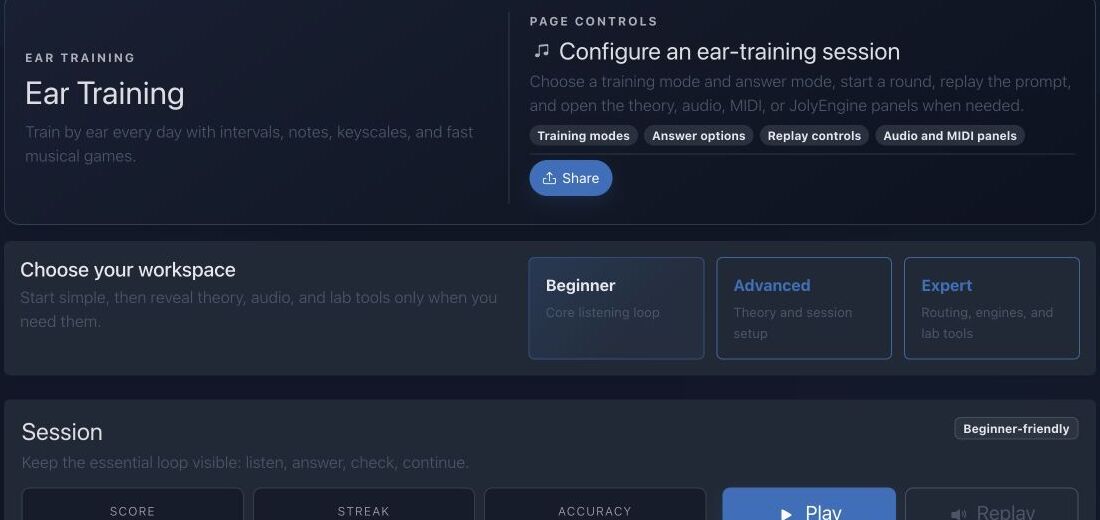
- Las tarjetas de espacio eligen alcance principiante, avanzado o experto.
- El modo cambia la tarea auditiva manteniendo una sesión coherente.
- Los controles gestionan reproducir, repetir, revelar y avanzar.
- Puntuación, racha y precisión separan persistencia de calidad real de reconocimiento.
Método paso a paso
- Elige un ejercicio como dictado de notas, memoria de acordes, reconocimiento de licks o un juego musical.
- Lee el panel teórico y entiende exactamente qué evalúa el ejercicio.
- Completa una serie corta sin cambiar la dificultad después de cada error.
- Revisa los errores recurrentes, canta la respuesta y repite la serie otro día.
Consejos de práctica
- Usa un tono de referencia solo cuando el ejercicio lo permita.
- La precisión a un ritmo tranquilo debe llegar antes que la velocidad.
Ejemplo guiado
Ejemplo: reconoce terceras mayores y menores
Limita la sesión a dos cualidades. Escucha una vez, canta la nota superior, responde y solo entonces repite. Tras diez intentos, aísla la dirección o registro con más errores y vuelve mañana.
Documentación canónica del proyecto
Esta referencia se genera directamente desde los archivos Markdown del repositorio; no está duplicada en los fixtures.
Source: Documentation/EarTraining.md
Exercise Modes
Melodic
Tones are heard in sequence. A question can move upward or downward when descending intervals are enabled. The answer normally identifies an interval unless a tone-answer mode is explicitly selected.
Harmonic
Tones are heard together. Timing is simultaneous at the question level, while the answer vocabulary remains driven by the loaded interval catalog.
Absolute
The answer identifies a tone rather than an interval. The mode service forces the answer mode to tone. The absolute picker can use a selected instrument and row layout so the learner answers on a physical representation.
The frontend is authoritative for exact question construction. New backend code must not assume every session uses the same answer type.
Question Lifecycle
The frontend controller performs:
- load interval definitions;
- load authenticated long-term stats when available;
- render answer controls;
- generate the next valid question;
- route playback through JolyEngine;
- evaluate or reveal the answer;
- update score, streak, and accuracy;
- queue session persistence for authenticated users;
- save with a beacon during page exit when possible.
The current question is retained for replay. next() clears old feedback and button states before generating another candidate.
The audio call is abortable. Disconnecting the controller cancels active playback and queued transitions to avoid stale sounds after navigation.
Session Persistence API
Save or Update a Session
POST /api/me/ear-training/session
route: api_me_ear_training_session_create
Requirements:
- fully authenticated user;
SubscriptionAccessVoter::WRITE;- JSON object body.
Accepted fields:
{
  "sessionKey": "client-stable-id",
  "score": 120,
  "correct": 8,
  "total": 10,
  "streak": 4,
  "durationMs": 90000,
  "mode": "melodic",
  "answerMode": "interval",
  "keyId": 1,
  "scaleId": 2,
  "rootMidi": 60
}
All integer counters are clamped to zero or greater. Accuracy is computed by the server:
accuracy = total > 0
    ? round(correct / total * 100)
    : 0
The server does not trust a client-supplied accuracy.
If sessionKey is empty, the server creates 16 random bytes and hex-encodes them. A matching (user, gameType=ear_training, sessionKey) updates the existing GameScore; otherwise a new row is persisted.
The entity's sessionKey column is globally unique. Clients should generate collision-resistant keys and reuse the same key only when updating the same logical session.
The saved payload includes:
mode
answerMode
correct
total
keyId
scaleId
rootMidi
savedAt
Existing payload keys are retained unless overwritten by these current values.
Read Aggregate Statistics
GET /api/me/ear-training/stats
route: api_me_ear_training_stats
Anonymous response:
{
  "sessions": 0,
  "total": 0,
  "correct": 0,
  "bestScore": 0
}
Authenticated response also contains:
correctAnswers
totalAnswers
accuracy
Aggregates include only:
gameType = ear_training
isCompleted = true
user = current user
Long-term accuracy is recalculated from summed correct and total answers. It is not an average of per-session percentages.
Failure and Recovery
Intervals fail to load
The controller cannot safely build questions and reports a load failure. Verify /api/intervals and frontend import loading.
No valid question
Relax one constraint: KeyScale, pitch range, descending direction, or answer mode.
Playback is silent
Assign a JolyEngine receiver, unlock browser audio, and verify the selected output/preset before changing theory context.
Statistics stay at zero
Confirm authentication, paid write access, a successful session POST, and isCompleted=true.
Duplicate sessions appear
The client is generating a new sessionKey for each save instead of reusing the logical session key.
Accuracy seems different from the client
The server calculates whole-number accuracy from correct / total. Long-term accuracy uses sums across all completed sessions.
Source: Documentation/mobile/MobileEarTrainingGuide.md
Circular Answer Paradigm
To maintain theoretical consistency with the Harmony Circle and Sonic Laboratory, the mobile Ear Training screens use a Radial Selection Grid.
1. The Clock-Face Answer Key
- Interval Mode: Intervals are arranged in a semi-circle or full circle (m2 at 1 o'clock, M2 at 2 o'clock, etc.).
- Tone Mode: The 12 chromatic pitch classes are arranged according to the Top-Anchor Rule (Root at 12 o'clock).
- Spatial Memory: By using a circular layout, the trainer builds the user's spatial intuition of musical distance, making it easier to transition to the Harmony explorer.
2. High-Fidelity Feedback
- Active Glow: When a question is played, the center of the circle "pulses" with the active instrument's primary color.
- Success Haptics: A double-tap haptic pulse triggers for correct answers.
- Visual Correction: If an answer is wrong, the "correct" node on the circle glows green while the user's selection fades in red, showing the distance between the two notes geometrically.
Persistence and Session Logic
Mobile sessions are tracked locally and debounced to the backend using the shared sessionKey pattern.
Aggregated Stats
GET /api/me/ear-training/stats- Stats are visualized on the Dashboard using the Concentric Activity Ring (Radial Progress).
Audio Implementation
Ear training requires sample-accurate playback:
- Immediate Trigger: Question audio must bypass the standard UI-thread delays.
- Sustained Harmony: Harmonic interval questions trigger notes simultaneously with perfect phase alignment.
Diagnóstico rápido
- Todo suena igual: reduce respuestas y canta cada intervalo de referencia.
- Solo mejoras repitiendo: responde desde la primera escucha y usa Replay para revisar.
- La racha viene del azar: observa precisión en una sesión más larga.
Comprobación antes de terminar
- El ejercicio evalúa una habilidad auditiva claramente nombrada.
- Volumen y timbre son consistentes entre preguntas.
- Los errores recurrentes quedan anotados para la próxima sesión.
Pasar a la práctica
Abre la herramienta relacionada y aplica inmediatamente este método a un ejemplo sencillo.