Primeros pasos
Empieza tu primera sesión de JolyMusic
Configura tu perfil, elige un instrumento y convierte una idea musical en una sesión de práctica enfocada.
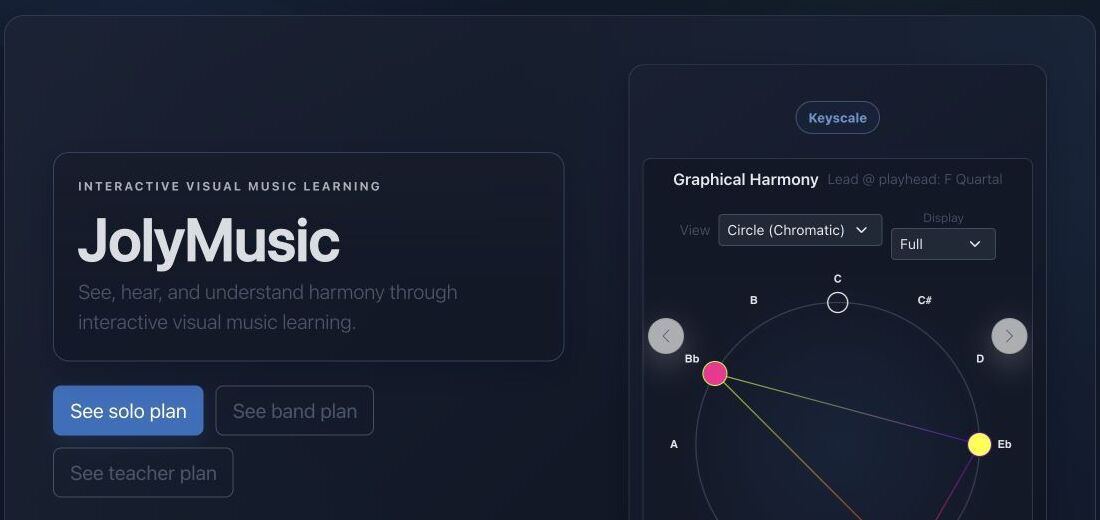
Objetivo
JolyMusic conecta teoría, escucha, visualización e interpretación. Empieza con un objetivo claro en vez de abrir todas las herramientas.
Referencias de la interfaz
- La navegación principal separa aprendizaje, práctica, composición, análisis y exploración.
- La vista de armonía gráfica convierte las relaciones de altura en una forma visible.
- Los botones de plan y cuenta muestran qué funciones personales están disponibles.
Método paso a paso
- Abre tu perfil y selecciona tu idioma y tus instrumentos favoritos.
- Elige una actividad: explorar un acorde, entrenar el oído, crear un ritmo o estudiar una interpretación.
- Escucha primero, observa la representación visual y después reproduce o transforma la idea musical.
- Guarda el material útil para continuar desde el mismo contexto en la próxima sesión.
Consejos de práctica
- Usa auriculares o altavoces fiables para comparar alturas cercanas.
- Las sesiones cortas y repetidas son más útiles que una sesión larga sin enfoque.
Ejemplo guiado
Ejemplo: una sesión enfocada de diez minutos
Elige Do mayor, escucha una vez, canta los siete grados, muestra las notas en tu instrumento favorito y termina con una ronda de oído. Mantén el mismo material para que cada acción refuerce las demás.
Documentación canónica del proyecto
Esta referencia se genera directamente desde los archivos Markdown del repositorio; no está duplicada en los fixtures.
Source: Documentation/GettingStarted.md
Purpose
JolyMusic is organized around reusable musical context rather than isolated pages. A productive first session establishes four things:
- an authenticated and verified user identity;
- a supported interface locale;
- one or more favorite instruments;
- an audio route that can actually render the chosen material.
The dashboard is an authenticated entry point, not a public landing page. The profile stores durable user preferences. Musical tools may also maintain temporary browser state, so saving a profile preference and saving a tool document are separate operations.
Audio Settings Contract
Both route aliases reach the same controller:
GET|PATCH /{_locale}/profile/jolyengine-settings
route: app_profile_jolyengine_settings

GET|PATCH /{_locale}/profile/audio-settings
route: app_profile_audio_settings
Authentication is required for both methods. GET returns:
{
  "settings": {}
}
PATCH additionally requires SubscriptionAccessVoter::WRITE. The request may be either the settings object itself or:
{
  "settings": {
    "playbackEngine": "tone"
  }
}
Unknown keys are discarded. Accepted top-level families include:
- device selection:
inputDeviceId,outputDeviceId; - main routing:
playbackEngine,soundPresetId; - drum, general instrument, mono, polyphonic, and microtonal defaults;
- Tone.js instrument, volume, and pan;
- oscillator waveform, volume, and pan;
- MIDI input/output, channel, volume, and pan;
- sampler backend, source kind, source URL, volume, and pan.
Engine Normalization
The general playbackEngine accepts:
tone
midi
sampler
frequency
An unsupported general engine falls back to tone.
Family defaults are stricter:
- drum, general instrument, and mono:
tone,sampler, ormidi; - polyphonic and microtonal:
toneormidi.
Unsupported family defaults become null, allowing the consumer to fall back to a broader setting.
Numeric Clamping
The controller clamps rather than rejects these values:
| Setting | Range | | :--- | :--- | | Tone/frequency/sampler volume | -60 to +12 dB | | Tone/frequency/sampler pan | -1 to +1 | | MIDI channel | 1 to 16 | | MIDI volume | 0 to 127 | | MIDI pan | 0 to 127 |
Preset IDs are converted to positive integers or null. frequencyWaveform accepts sine, triangle, square, and sawtooth, falling back to sine. samplerBackend normalizes to standalone or lazy; samplerSourceKind is forced to sfz.
Legacy tonePresetId, samplerPresetId, or presetId can supply soundPresetId when the modern key is absent.
Recommended First Session
Use one stable musical object through the whole session:
- select a locale and favorite instrument;
- open one KeyScale;
- listen through the configured engine;
- sing or identify its degrees;
- map it onto the chosen instrument;
- create or open one short Performance, Harmony, rhythm, or ear-training round;
- save only after verifying playback and visibility.
This sequence avoids changing the theoretical collection, instrument layout, and sound engine at the same time. When something sounds wrong, only one layer needs to be inspected.
Troubleshooting
Dashboard returns 403
The user may be authenticated but not verified. Account verification is checked after authentication.
Profile action redirects to login
The session is not authenticated. Profile reads do not silently create an account or token.
A preference cannot be saved
Write actions are subscription-gated. Confirm SubscriptionAccessVoter::WRITE, then validate CSRF where the route is form-based.
A favorite instrument disappears
The stored ID may no longer be selectable for the user because publication, ownership, or team visibility changed.
Playback is silent
Check, in order:
- browser audio permission and physical output volume;
outputDeviceId;playbackEngine;- required preset or sampler source;
- the tool's assigned JolyEngine receiver;
- whether the current musical object contains playable events.
A malformed PATCH changes unexpected settings
It should not: unknown keys are dropped. If a known key behaves unexpectedly, inspect its normalization branch in ProfileAudioSettingsController::sanitizeAudioSettings().
Diagnóstico rápido
- No hay sonido: abre los ajustes de audio, selecciona un motor de salida y confirma el volumen antes de cambiar datos musicales.
- Demasiadas opciones: vuelve a una tonalidad, un instrumento y una habilidad para esta sesión.
- El trabajo desaparece: inicia sesión antes de crear recursos personales o de equipo.
Comprobación antes de terminar
- El idioma y los instrumentos favoritos están configurados.
- La reproducción funciona a un nivel seguro.
- La sesión tiene un objetivo musical escrito.
Pasar a la práctica
Abre la herramienta relacionada y aplica inmediatamente este método a un ejemplo sencillo.