Interpretación
Trabaja con instrumentos e interpretaciones
Elige un instrumento, observa su disposición y convierte el material musical en una interpretación interactiva.
Objetivo
Los instrumentos describen cómo se distribuyen y ejecutan los tonos. Las interpretaciones añaden eventos, gestos, voces y comportamiento visual.
Referencias de la interfaz
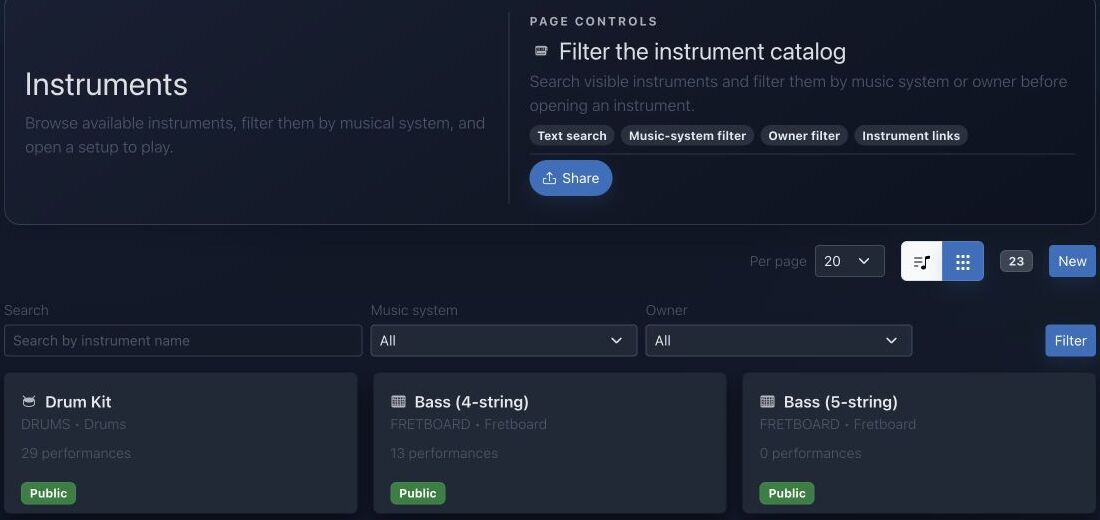
- La búsqueda encuentra nombres y familias de instrumentos.
- El sistema musical limita el catálogo a un marco de afinación.
- El filtro de propietario separa recursos públicos, personales y de equipo.
- Las tarjetas muestran interpretaciones disponibles y abren páginas tocables.
Método paso a paso
- Abre el catálogo y selecciona el instrumento o la disposición que quieres practicar.
- Examina su rango, filas, catálogo de digitaciones, intérprete y comportamiento sonoro.
- Abre una interpretación existente o crea una desde el instrumento elegido.
- Añade contenido musical, verifica la reproducción y usa el intérprete visual para estudiar tiempo y gesto.
Consejos de práctica
- Confirma la afinación antes de interpretar posiciones de trastes o filas.
- Practica lentamente una sola voz antes de combinar varias capas.
Ejemplo guiado
Ejemplo: coloca una escala en la guitarra
Abre Guitarra, confirma afinación estándar, elige Do mayor y muestra las posiciones. Selecciona una zona compacta, toca lentamente y abre una interpretación compatible para estudiar tiempo y digitación.
Documentación canónica del proyecto
Esta referencia se genera directamente desde los archivos Markdown del repositorio; no está duplicada en los fixtures.
Source: Documentation/Instrument.md
Overview
The Instrument system is composed of four main components:
InstrumentEntity: The Doctrine ORM entity that maps to theinstrumenttable in the database.InstrumentDtoDTO: A read-only Data Transfer Object used for exposing and manipulating instrument data through the API.InstrumentProvider: A state provider for API Platform that handles the transformation ofInstrumententities intoInstrumentDtoDTOs.InstrumentProcessor: A state processor for API Platform that handles the persistence ofInstrumentDtodata to the database.
Instrument view range controls
Keyboard and fretboard instruments now expose range controls inside the instrument view (assets/instrument/controllers/instrumentView/controller.js). Those cards let you pick a minimum/maximum octave (for KEYBOARD) or fret number (for FRETBOARD), and the controller filters the rows before rendering the keyboard/fretboard layout or recomputing template matches. Every range change dispatches an instrument-view:range-change event with the selected bounds plus the filtered row IDs.
assets/pianoroll/stimulus/PianoRollControllerAdapter.js listens for that event and keeps the Pianoroll lanes in sync: it stores the unfiltered rows, applies the same min/max filters on the instrument rows payload, and re-emits the filtered set so the lane gutter also only shows the notes/frets that fall within the chosen window. This keeps the piano roll and instrument view aligned when you tighten down a note/fret range.
Source: Documentation/Performer.md
Overview
The Performer system is composed of two main components:
PerformerEntity: The Doctrine ORM entity that maps to theperformertable in the database.PerformerOutputDTO: A read-only Data Transfer Object used for exposing performer data through the API.
There is no dedicated StateProvider or Processor for Performer.
Source: Documentation/Performance.md
Overview
A Performance is JolyMusic's timed, playable projection of musical material onto an Instrument and optionally a Performer. It combines:
- an instrument layout;
- performer actors, articulations, and gestures;
- one or more ordered voices;
- timed performer events;
- global tempo, meter, and key events;
- linked Harmonies;
- metadata and editor/runtime configuration;
- owner, team, and public visibility.
It is not merely a MIDI note list. The model preserves enough information to render an instrument-specific workspace, reconstruct source provenance, activate performer elements, produce compact playback data, and link events to harmony context.
State Endpoint
API Platform exposes:
GET /api/performances/{id}/state
GET /api/performances/{id}/state.json
The web controller also exposes:
GET /{_locale}/performances/{id}/state.json
route: performance_state
PerformanceStateProvider requires PerformanceVoter::VIEW. It accepts:
tick=<non-negative integer>
runtime=workspace
lean=true
runtime=workspace or a truthy lean flag selects the lean runtime representation.
Full State
PerformanceStateOutput includes:
id, name, targetDescription, ppq
metadata, config, isPublic, ownerId, teamIds
currentTick
target, performer, performerState, performerCatalog
elements, activeElements, notes
globalEvents, harmonies
executionGraph, scorePreview
Default normalized config is:
{
  "zoom": 1.0,
  "bpm": 120,
  "loop": false,
  "loopStartBar": 1,
  "loopEndBar": 8,
  "ppq": 960,
  "activeHarmonyId": null,
  "globalKeyId": null,
  "timeSignature": "4/4",
  "beatsPerBar": 4,
  "beatUnit": 4
}
Stored config overlays these defaults. Consumers should use the normalized output instead of reimplementing defaults.
Compact Runtime
The compact format identifies itself as:
performance-runtime-v1It carries a noteSchema describing positional note rows and a compact global-event schema. Current note keys are:
id, t, d, r, m, v, el, art, gest, voice,
fret, str, hand, lane, xml, measure, p,
sel, prev, sv, ss, sm, x, y, z
The schema array is part of the payload specifically so consumers do not have to hard-code positional meaning without a version signal.
For persisted Performances, runtime events may be read through PerformanceRuntimeEventReader without hydrating the entire event graph. For transient objects, the builder derives compact rows from the entity collections.
PerformanceRuntimeResponseFactory adds cache behavior appropriate to public versus protected state. Tests cover the response contract; clients should respect validators and cache headers rather than assuming every state response is permanently private or permanently cacheable.
Authorization
PerformanceVoter defines:
PERFORMANCE_VIEW
PERFORMANCE_EDIT
Rules:
- anyone can view a public Performance;
- the owner can view it;
- any member of a linked team can view it;
- owner, team
OWNER, or teamADMINcan edit; - edits also require a user allowed to write paid features;
- application administrators and super administrators satisfy the paid-write check.
Public visibility never implies edit permission.
Troubleshooting
State returns 403
The Performance is neither public, owned, nor shared through a team visible to the requester.
State has no notes
Check whether the request used lean runtime, whether persisted runtime rows exist, and whether performer events have valid timing and instrument rows.
Notes appear but no active elements
Lean runtime intentionally returns an empty activeElements list. Otherwise verify the requested tick against the half-open event interval.
Wrong instrument position
Inspect the event's instrumentRow, source metadata, and the current instrument layout. Imported pitch and physical row resolution are separate.
Harmony context is unexpected
Inspect ordered PerformanceHarmony links, the single lead flag, link config, and global key events.
A team member cannot edit
Ordinary membership grants view only. Team role must be OWNER or ADMIN, and the user must pass paid-feature write access.
Diagnóstico rápido
- Las posiciones no coinciden: revisa número de cuerdas, afinación, lateralidad y sistema musical.
- Interpretación no disponible: comprueba familia de instrumento y visibilidad.
- Reproducción fuera del rango: revisa el registro o transpón la interpretación.
Comprobación antes de terminar
- La definición coincide con el instrumento físico.
- El rango es tocable sin transposición oculta.
- Gestos visuales y eventos audibles están sincronizados.
Pasar a la práctica
Abre la herramienta relacionada y aplica inmediatamente este método a un ejemplo sencillo.