Ritmo
Practica con ritmos y play-alongs
Visualiza ciclos rítmicos, aísla pistas, repite secciones y construye un pulso fiable.
Objetivo
Los ritmos circulares hacen visibles las estructuras repetitivas y los play-alongs combinan pistas sincronizadas y armonía.
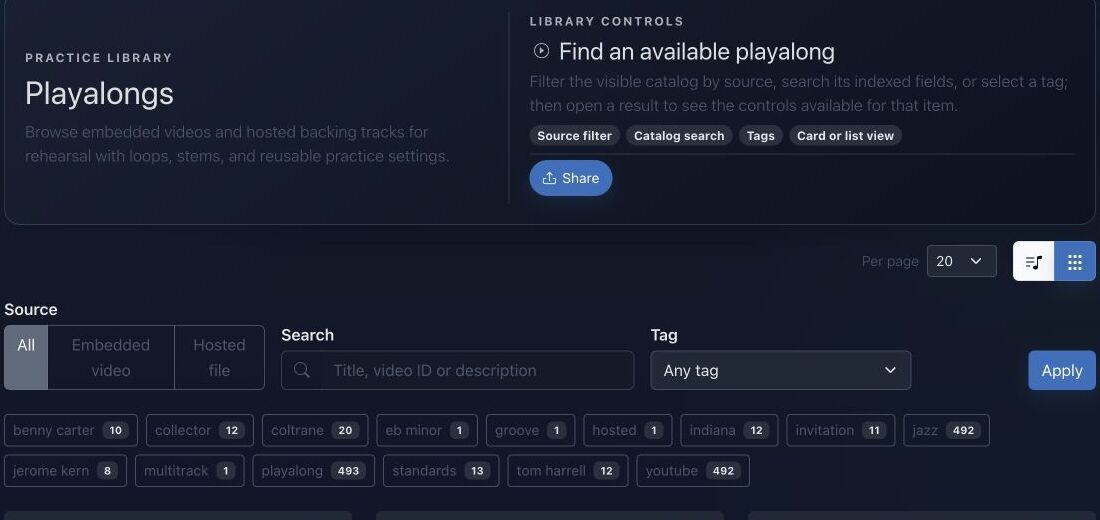
Referencias de la interfaz
- Fuente separa vídeos incrustados, archivos alojados, bucles y multipistas.
- Búsqueda y etiquetas reducen una biblioteca amplia.
- Las tarjetas muestran disponibilidad y abren el reproductor sincronizado.
- Dentro del play-along, las pistas ofrecen mute, solo, balance y repetición.
Método paso a paso
- Elige un ritmo circular o play-along adecuado para tu estilo y nivel.
- Define un tempo cómodo y escucha una vez antes de tocar.
- Silencia, aísla o equilibra pistas para dejar espacio a tu propia parte.
- Repite la sección difícil, aumenta el tempo gradualmente y después toca la forma completa.
Consejos de práctica
- Mantén estable la subdivisión antes de trabajar fills u ornamentación.
- Graba una pasada y comprueba si tus ataques coinciden con el pulso.
Ejemplo guiado
Ejemplo: aprende un groove de cuatro compases
Abre un groove multipista, deja solo batería y bajo y marca la subdivisión. Añade tu instrumento a mitad de tempo, repite cuatro compases y después restaura las pistas para tocar la forma completa.
Documentación canónica del proyecto
Esta referencia se genera directamente desde los archivos Markdown del repositorio; no está duplicada en los fixtures.
Source: Documentation/CircularRhythm.md
Canonical State Envelope
A newly created integration template uses:
{
  "bpm": 120,
  "ppq": 960,
  "beatsPerBar": 4,
  "beatUnit": 4,
  "circularTrack": {
    "id": "standalone",
    "type": "CIRCULAR",
    "name": "New Circular Rhythm",
    "config": {
      "engineType": "sampler"
    },
    "audioEngine": {
      "engineType": "sampler"
    },
    "rings": []
  }
}
The web form's initial state is similar but may omit transport fields it can default later. Therefore consumers must apply defaults rather than requiring every optional key.
The only structural requirements enforced by the integration write controller are:
state is an object
state.circularTrack is an object
state.circularTrack.rings is an array
name is non-empty
Ring and step details are normalized for selection and playback, but the persistence column remains flexible.
Timing Interpretation
Transport defaults are normalized for selector output:
bpm: clamped to 40..220
ppq: at least 1
beatsPerBar: at least 1
beatUnit: at least 1
The persisted state may contain broader or malformed values because it is flexible JSON. Playback clients should consume normalized controller/provider output where available and defensively clamp state imported from elsewhere.
For radial geometry, hit testing, and conceptual PLL synchronization, see [Mobile Circular Rhythm Guide](./mobile/CircularRhythmGuide.md). Those client recommendations do not expand the backend wire contract.
Troubleshooting
The rhythm is not in the public catalog
Verify isPublic, owner identity, and repository visibility. Paid status does not make a rhythm public.
Saving updates somebody else's rhythm
It should not. The web controller computes canSaveCurrent from both paid write access and CircularRhythmVoter::EDIT; otherwise it creates a copy.
Rings disappear in selector output
Non-array ring or step values are discarded by normalization. Inspect state.circularTrack.rings.
The wrong sampler loads
Inspect both audioEngine and config. Existing config overlays the default engine. A missing engine intentionally falls back to the bundled MuldjordKit SFZ.
Tags appear different for two users
Owner tags are shared; user tags are viewer-specific overwrites.
Delete returns 404 rather than 403
The web delete action intentionally hides unauthorized object existence by throwing not found when DELETE is denied.
Source: Documentation/PlayAlong.md
Overview
A PlayAlong is a practice-oriented media aggregate. It can represent:
- an embedded video, especially YouTube;
- one hosted audio file;
- a hosted multitrack session with independent stems;
- linked Harmony context;
- tempo and pitch transformation capabilities;
- user-saved mixer/loop settings.
The aggregate describes what is available. It does not imply that every source supports every transformation. Capability flags, source type, file presence, authorization, and transform-service availability all participate.
Track Model
Each PlayAlongTrack contains:
label
path, mimeType, originalFilename, extension
byteSize, checksum, durationMs
role, instrumentCode, stemType
position
volumeDb, pan
isMuted, isSolo, isPrimary
metadata
Stem types:
full_mix
drums
bass
harmony
melody
click
other
Normalization:
- position is at least zero;
- volume is clamped to
-60..+12dB; - pan is clamped to
-1..+1; - extension, role, and instrument code are lower-cased;
- tracks are ordered by position, then ID.
Track metadata is flexible. Playback code must use stable fields first and tolerate unknown metadata.
Audio Transform Jobs
Single Transform
POST /api/playalongs/{id}/transform-jobsThe source may be the requested track or the root hosted file. At least one tempo or pitch request is required.
Batch Transform
POST /api/playalongs/{id}/transform-batchThe batch endpoint supports a global tempo ratio/target, global key metadata, and per-track pitch changes.
Important clamps:
tempoRatio: 0.25..4.0
targetTempoBpm: at least 1
pitchShiftSemitones: -24..+24
Transforms require:
- visible PlayAlong;
- authenticated user;
- ownership or paid membership according to
canTransformPlayAlong(); hosted_filesource type;- a source path;
- matching capability flag.
The controller persists jobs with:
queuedand a payload identifying:
processor = python_audio_transform
source path and MIME
source track
PlayAlong
tempo request
pitch request
options
Batch processing runs through PlayAlongAudioTransformService with bounded concurrency. Unchanged tracks can be returned as original without creating a job.
Job Lifecycle
PlayAlongTransformJob status constants cover queued, processing, completed, and failed states. Output includes request parameters, output path/MIME/size, error message, and lifecycle timestamps.
A 202 Accepted single-job response means queued, not completed. Clients must not use an output path until status is completed.
Troubleshooting
Transform returns 422
Check source type, source path, requested change, and the corresponding capability flag.
Transform returns 403
The PlayAlong may be visible but the user lacks ownership/paid transformation rights.
Harmony link is absent from output
The Harmony has its own visibility rule and may be private to another owner.
Multitrack setting cannot save
After normalization, there are no playable tracks. Verify IDs correspond to current PlayAlong tracks.
YouTube looper has no loops
Inspect normalized metadata and saved state. A YouTube video ID alone does not create loop ranges.
Volume or pan changes unexpectedly
Entity setters clamp volume and pan. Saved user mixer state is also normalized against current tracks.
Batch output contains original
That track required neither tempo nor pitch processing. This is a successful skip, not a failed job.
Source: Documentation/mobile/CircularRhythmGuide.md
Synchronized Timing (PLL)
The mobile sequencer uses a Phase-Locked Loop (PLL) approach to ensure the UI and Audio never drift:
- Master Phase: The audio engine (Oboe) maintains a continuous phase value from $0.0$ to $1.0$ for the current bar.
- Needle Interpolation: The playback needle position is calculated as $\theta = (\text{phase} \times 360^\circ) - 90^\circ$.
- Sub-sample Accuracy: By using a float-based phase rather than discrete integer steps, the needle moves with 60fps smoothness regardless of the BPM.
Interaction: Polar Painting
The sequencer supports High-Density Multi-touch Sweeping, allowing users to "paint" rhythm patterns across concentric rings.
- Polar Intersector:
- Radius ($r$): $\sqrt{dx^2 + dy^2}$ identifies the ring index.
- Angle ($\theta$): $((\text{atan2}(dy, dx) \times 180/\pi) + 90 + 360) \pmod{360}$ identifies the step index.
- Tactile Feedback: Every toggled step triggers a
TextHandleMovehaptic tick.
Theoretical North (Top-Anchor Rule)
- Beat 1 Alignment: Step 0 of every ring MUST be anchored at 12 o'clock (0°).
- Haptic Anchor: Trigger a
LongPresshaptic pulse exactly as the needle crosses the 12 o'clock position to provide tactile "Downbeat" confirmation.
Diagnóstico rápido
- Las pistas se desincronizan: recarga y verifica que todos los archivos sean de la misma versión.
- El bucle hace clic o corta notas: mueve límites fuera de ataques sostenidos y revisa su longitud.
- Pierdes el pulso al silenciar: mantén audible metrónomo, percusión o bajo.
Comprobación antes de terminar
- Tempo y subdivisión son estables sin la mezcla completa.
- Los límites cubren tiempos o compases completos.
- La pasada final funciona con todas las pistas restauradas.
Pasar a la práctica
Abre la herramienta relacionada y aplica inmediatamente este método a un ejemplo sencillo.