Composición
Genera ideas con RunFormula
Convierte una fórmula musical compacta en líneas audibles dentro de un contexto de tonos, KeyScale, instrumento o Armonía.
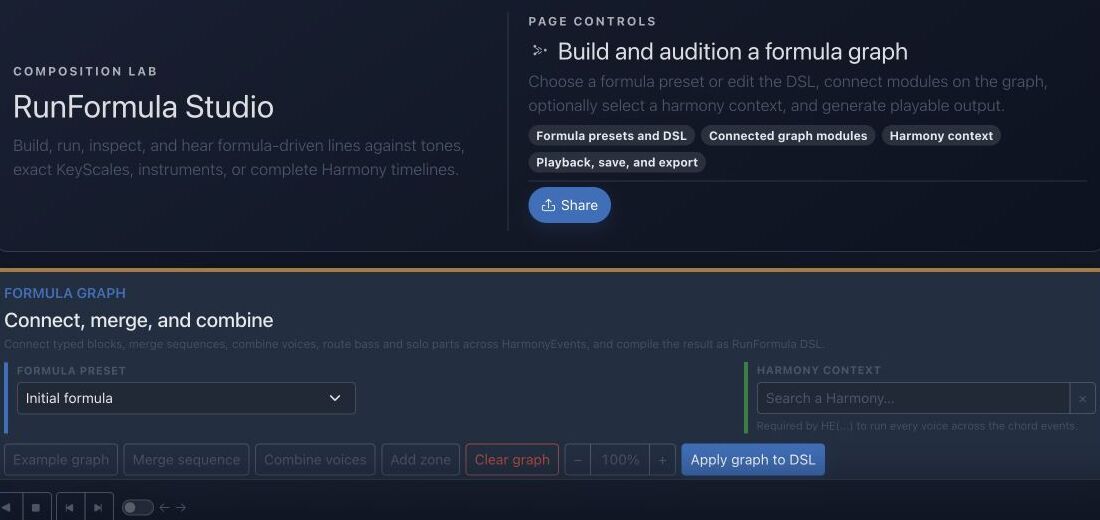
Objetivo
RunFormula describe un comportamiento melódico y rítmico repetible. El estudio permite inspeccionar cada evento antes de reutilizar el resultado.
Referencias de la interfaz
- El preset aporta un grafo y DSL conocidos como punto de partida.
- Los módulos muestran etapas de generación y conexiones.
- El contexto de Armonía decide qué tonos son válidos en cada momento.
- Reproducción, guardado y exportación convierten el resultado en material reutilizable.
Método paso a paso
- Empieza con un preset guardado o introduce una fórmula personalizada pequeña.
- Elige el contexto musical: tonos, una KeyScale exacta o una línea temporal completa de Armonía.
- Selecciona un instrumento y los límites de salida y genera el resultado.
- Inspecciona y escucha cada evento; simplifica la fórmula si la intención musical no está clara.
Consejos de práctica
- Añade un operador cada vez para poder escuchar su efecto.
- Guarda los resultados sólidos como material reutilizable en lugar de conservar complejidad accidental.
Ejemplo guiado
Ejemplo: genera una línea ascendente limitada
Elige un preset de recorrido de escala, define Do mayor como KeyScale exacta, limita a ocho eventos y selecciona instrumento. Genera, revisa alturas y duraciones y cambia un solo operador.
Documentación canónica del proyecto
Esta referencia se genera directamente desde los archivos Markdown del repositorio; no está duplicada en los fixtures.
Source: Documentation/InstrumentedRunFormula.md
Quick Reference
1 2 3 5 / +1 @16Plays current-KeyScale degrees 1 2 3 5, repeats the pattern, moves the next repetition up one KeyScale degree, and starts steps on a sixteenth-note grid.
R12(regen=pass;1=1;5=3;9=5) / 0 @16 P(8n.,16n,8n,16n)Creates a new twelve-tone row on every 12-note pass, fixes current-KeyScale degrees 1, 3, and 5 at row positions 1, 5, and 9, keeps every pitch class unique inside each row, and applies a repeating note-length pattern.
C:Ab:Dim7(e(1; d+1+s-1 t) 3 5 2):16n / 0 @16 T(*:2,4:1=[3,(F#4),((+3))]) H(d+2,s+7)Uses the closest A-flat diminished-seventh collection, a structured enclosure, beat-position targets, and two generated harmony voices.
1 1 1 1 / 0 @4 BASS(style=walking;pattern=1,3,5,7;approach=chromatic;target=1;range=E1..C4;anchor=E2;direction=closest;maxLeap=9;variation=cycle;voice=1) A(108,78,86,74)Builds a walking bass from chord roles, keeps it in bass register, and uses the final onset to approach the next HarmonyEvent's root when a next event exists.
Processing Order
The runtime applies the language in this order:
- split non-empty text lines into autonomous formula voices;
- extract
SEED(...)and initialize its deterministic random stream; - remove
T(...),H(...),P(...), and the advanced postfix operators for later application; - expand
R12(...),PAL(...), andCH(...)sources; - parse sources, groups, cells, enclosures, transformations, repetition movement, variation, and timing;
- generate base events while checking the selected instrument rows;
- apply
P(...), thenT(...), thenH(...); - apply advanced postfix operators in the exact order in which they were written;
- reject pitches outside the selected instrument rows and order the final events by onset and voice.
This ordering matters. For example, a T(...) rule matches the onset time after P(...) has retimed the performance, and H(...) harmonizes the final targeted pitch. SEED(...) is the one postfix operator with an early side effect: it seeds every random decision in the formula even when it is written last.
Graph Resolution Algorithm
Each item owns a stable nodeKey. Its connections.inputs list contains upstream node keys in semantic order. The compiler:
- indexes all items by
nodeKeyand rejects duplicates; - chooses
config.outputNodewhen present; - otherwise chooses the final item by
position, thennodeKey; - recursively compiles upstream
inputs; - rejects missing nodes and graph cycles;
- renders the current item type around or after its compiled input;
- stores the non-empty result in the formula projection.
Only join declares acceptsMany=true. Other input-capable types consume their first compiled data input. The state processor also validates dataInputs, timeInputs, and timelineInputs as known non-self references, but the server DSL compiler uses inputs for semantic compilation. Timeline connections and visual zones remain layout/documentation concerns.
Ordering has three distinct meanings:
RunFormula.positionorders preset badges inside a preset type;RunFormulaItem.positionprovides deterministic block ordering and the fallback output choice;- the order inside
connections.inputsdefines order for a multi-input join.
Formula Generates No Notes
Check in this order:
- the formula is not empty and contains at least one non-comment line;
- Note start is valid (
C,F#,Bb,F5); - the current KeyScale has resolvable tones;
- the selected instrument exposes MIDI row values;
- the first complete onset is inside the instrument's exact MIDI map;
- every member of a first bracket is playable;
- a
Ptoken is notr,?0, or repeatedly failing probability; - the chosen fixed note/interval is not outside the instrument.
Base voices stop at the first unplayable atomic step. Therefore one bad first bracket can make a valid-looking formula produce no base events.
Prefer Orthogonal Blocks
Good:
R12(regen=pass;1=1;5=3;9=5) / 0 @16 P(8n,16n) T(*:2,4:1=3) H(d+2)The row controls pitch-class inventory, timing controls the source grid, P controls duration, T controls metrical goals, and H controls added voices.
Avoid embedding several responsibilities in a raw block when typed blocks exist. Typed blocks allow admin/API validation, visual editing, preset diffs, and field-level evolution.
Diagnóstico rápido
- No se generan eventos: revisa conexiones, campos obligatorios y límites.
- Notas fuera de armonía: confirma el contexto y si hay operadores cromáticos activos.
- Línea válida pero poco musical: simplifica ritmo, rango u objetivo antes de añadir módulos.
Comprobación antes de terminar
- Cada módulo tiene una finalidad musical concreta.
- Los eventos permanecen en rango y contexto.
- Has escuchado, inspeccionado y guardado o descartado el resultado intencionalmente.
Pasar a la práctica
Abre la herramienta relacionada y aplica inmediatamente este método a un ejemplo sencillo.