Tools and sharing
Connect audio, MIDI, media, and teamwork
Configure playback, inspect or exchange MIDI, organize media, and share the right resources with collaborators.
Goal
JolyMusic becomes a complete workspace when audio settings, MIDI tools, media assets, profiles, and team visibility are used together.
Interface landmarks
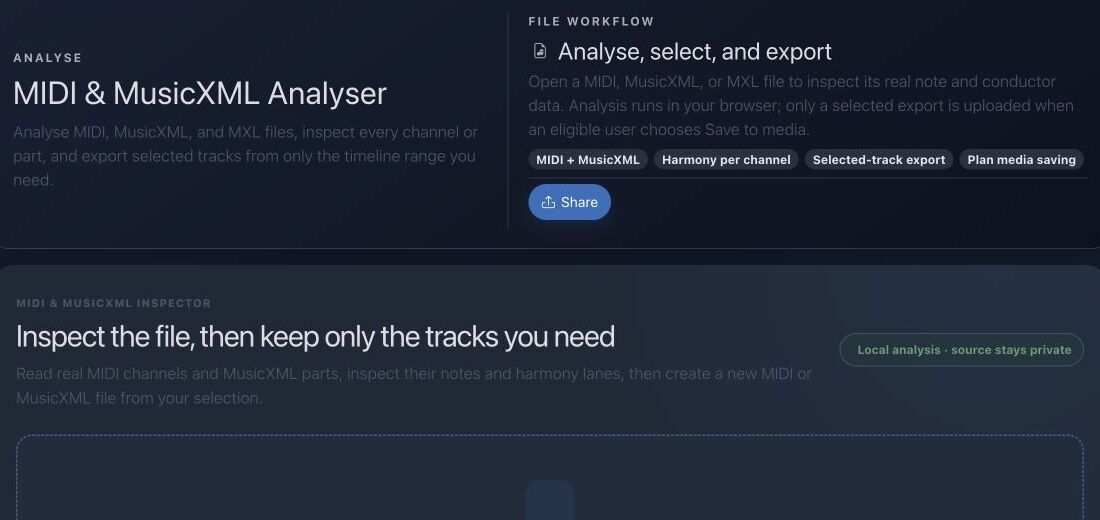
- The file drop zone accepts MIDI, MusicXML, and supported analysis inputs.
- Track inspection reveals channel, range, timing, and event structure before export.
- Selection controls let you keep only the musical tracks you need.
- Playback and save actions connect analysis with the media library and later workflows.
Step-by-step workflow
- Configure your global audio engine, output level, and preferred presets in your profile.
- Use MIDI and audio tools to inspect, import, analyze, or export musical material.
- Store reusable files in the media library with clear names and appropriate visibility.
- Use teams and shared resources when collaborators need access; keep personal experiments private.
Practice tips
- Test audio at a moderate level before starting playback.
- Only share media for which you have the necessary rights and permissions.
Worked example
Example: inspect a MIDI rehearsal file
Drop the file, identify tempo and time signature, listen to each track, remove duplicate guide tracks, and verify instrument channels. Save the cleaned selection, then reuse it in a performance or DAW export.
Canonical project documentation
This reference is generated directly from repository Markdown; it is not duplicated fixture copy.
Source: Documentation/MediaAsset.md
Overview
MediaAsset is the catalog record for an uploaded, generated, analyzed, hosted, or externally referenced media object. It separates:
- metadata and access rules in Doctrine;
- file bytes at a path or URL;
- optional typed classification through
MediaAssetType; - optional tool-specific metadata and audio analysis;
- personal, teacher, or band audience context.
A database row does not prove that the file is locally managed or currently reachable. path can describe a managed public upload or an external/non-managed location. Deletion logic intentionally distinguishes those cases.
Upload Pipeline
The web upload route requires:
- authenticated user;
- paid-feature write access;
- valid
media_uploadCSRF token; - at least one uploaded file.
Files are stored under:
public/uploads/media/{YYYY}/{MM}/u{userId}/The filename is:
{slugified-original-base}-{4 random bytes as hex}.{validated-extension}For each file:
UploadSecurityValidatorvalidates upload integrity, size, extension, and detected MIME;- the file is moved to its managed path;
- size and SHA-256 checksum are calculated from the stored file;
- image dimensions are read when applicable;
- a
MediaAssetInputis passed to the same processor used by API writes; - a failed database/processor step removes the just-moved file.
Upload metadata includes:
{
  "originalName": "source filename",
  "uploadedVia": "media_library_form"
}
Upload Security
General media uploads are capped at:
100 MiBAvatar uploads use a separate 5 MiB cap and a narrower extension/MIME policy.
Validation uses server-observed file state and MIME detection. Client-provided MIME and filename alone are not trusted.
Authorization
MediaAssetVoter defines:
MEDIA_ASSET_VIEW
MEDIA_ASSET_EDIT
MEDIA_ASSET_DELETE
Rules:
- public assets: anyone can view;
- owner: view/edit/delete;
- application admin/super admin: view/edit/delete;
- linked team member: view only;
- everyone else: denied.
The processor separately requires paid write access, plan-compatible audience, team membership for selected teams, and quota capacity.
Troubleshooting
Row exists but file is unavailable
The path may be external, stale, or no longer present. Database persistence does not verify permanent remote availability.
Delete leaves a file behind
The path may be non-managed or shared by another row. Both behaviors are intentional.
Band upload falls back to solo
The web form normalizes unsupported audience choices. Confirm band subscription and at least one selected team membership.
API returns not found for a known ID
The current user cannot see that asset under public/owner/team rules.
Kind differs from submitted kind
An attached MediaAssetType code is authoritative.
Quota rejection after replacing a file
Inspect owner and every newly/shared team's projected file count and byte usage; quota is enforced across both scopes.
Source: Documentation/daw/JolyEngineDawDefaults.md
Track Layout
| Track | Role | MIDI channel | Suggested DAW device | | --- | --- | ---: | --- | | Joly Harmony | Chords, pads, comping | 1 | Poly synth, electric piano, or pad | | Joly Bass | Bass roots and slash-chord bass | 2 | Mono bass | | Joly Guide | Guide tones and scale runners | 3 | Soft lead | | Joly Accent | Pulse notes and rhythmic stabs | 4 | Short pluck | | Joly FX | Impacts, risers, texture | 5 | Sampler or one-shot rack | | Joly Melody | Melody maker | 6 | Lead synth or melodic instrument | | Joly Solo | Solo improviser | 7 | Lead synth | | Joly Drums | Drum clock and kit hits | 10 | Drum rack, Drum Machine Designer, or GM kit |
Shared MIDI CCs
| CC | Meaning | Target | | ---: | --- | --- | | 1 | Modulation | Performance intensity | | 2 | Breath | Phrase dynamics | | 7 | Volume | Track level | | 10 | Pan | Track pan | | 11 | Expression | Phrase volume | | 64 | Sustain | Hold harmony and melody notes | | 71 | Resonance | Filter resonance | | 74 | Brightness | Filter cutoff | | 91 | Reverb | Reverb send | | 93 | Chorus | Delay or chorus send |
Remote-control CCs are reserved on channel 16:
| CC | Target | | ---: | --- | | 20 | Master level | | 21 | Bass level | | 22 | Harmony level | | 23 | Melody level | | 24 | Drums level | | 25 | JolyEngine complexity | | 26 | Bars per chord | | 27 | Style select | | 28 | Pattern select | | 29 | Include drums | | 30 | Include FX | | 31 | Panic / all notes off |
Source: Documentation/mobile/MobileMediaAssetsApi.md
Metadata & Caching
Persist the following fields when present:
| Field | Mobile use | | :--- | :--- | | id, title, nameSlug | Stable identity, list labels, and local route keys. | | kind, mediaAssetType | Preview and playback routing. | | audience, isPublic, teams, owner, quota | Visibility and feature-gate decisions. | | mimeType, extension, path | Binary loading and fallback preview detection. | | byteSize, checksum | Offline storage budgeting and content verification. | | durationMs, pageCount, widthPx, heightPx | Player, document, and image layout sizing. | | metadata, trackContainer | Structured tool-specific payloads and sequencer state. | | audioAnalysis | Radial pulse intensity and waveform summaries during playback. | | createdAt, updatedAt | Sync freshness and cache ordering. |
Use checksum for content-addressed files when it is available. If no checksum is present, cache by media asset id plus updatedAt.
Offline Rules
- Download binaries lazily for playback, preview, or explicit offline pinning.
- Never pre-download every media asset from bootstrap or aggregate sync.
- Keep offline files under a visible user budget.
- Keep metadata rows after a failed binary download so lists and retry actions still work.
- On
304 Not Modified, keep the existing Room rows and cached files.
Source: Documentation/mobile/MobileAudioEngineInterface.md
Clock Ownership
The audio engine owns musical transport while playing. UI animation, Room, WorkManager, WebView timers, and wall-clock time must not schedule notes.
Use a monotonic frame/host clock and integer musical ticks:
transport: bpm, ppq, beatsPerBar, beatUnit, loopTicks
position: absoluteTick, loopTick, framePosition, monotonicTimeNanos
Phase zero is loop tick zero. The renderer maps normalized phase to the 12 o'clock top anchor; this visual convention must not alter audio timing.
Scheduling
- Convert ticks to frames using the current tempo segment and sample rate.
- Retain integer/rational values as long as possible to avoid accumulated float drift.
- Schedule ahead by a bounded horizon appropriate to the backend.
- Support different ring subdivisions from a common master transport; do not require every ring to have 16 steps.
- Define behavior for tempo change: immediate, next beat, next bar, or next loop.
- Define note-off ownership so stop, seek, route loss, and lifecycle interruption cannot leave stuck voices.
Quick troubleshooting
- The file is rejected: confirm format, extension, size, and whether it contains readable musical events.
- Wrong instruments play: inspect MIDI channels, program changes, and the active sound preset.
- Shared media is invisible: verify ownership and public, team, or private visibility.
Before you finish
- Tempo, meter, channels, and track names have been inspected.
- Only necessary tracks remain selected.
- Visibility and usage rights are correct before sharing.
Continue in JolyMusic
Open the related tool and apply this workflow immediately to one simple example.