Music theory
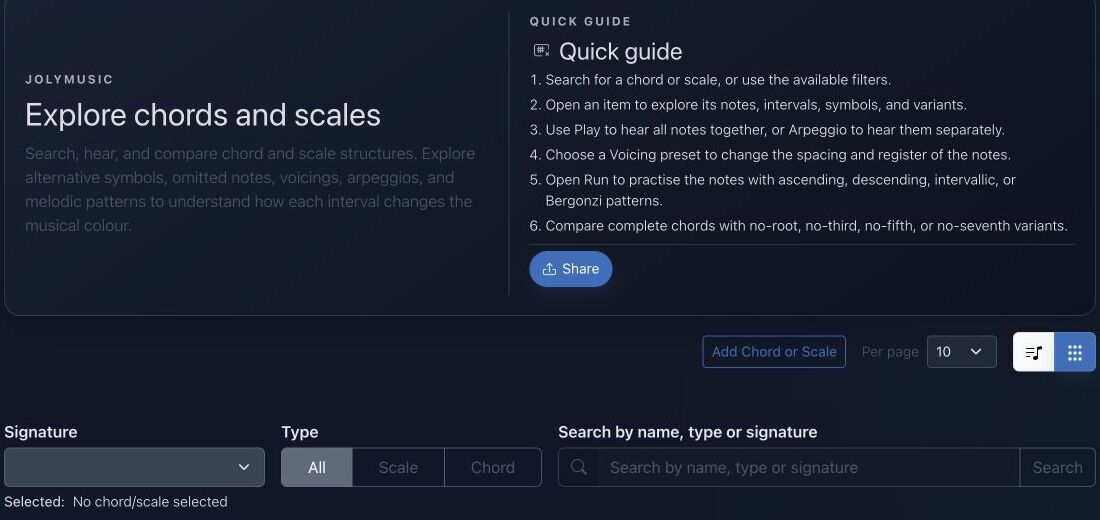
Explore chords and scales
Find exact KeyScales, hear their notes, compare relationships, and transfer the result to your instrument.
Goal
The chords and scales catalog is the central place for connecting a root key with a scale or chord structure.
Interface landmarks
- Signature chooses the written root and accidental spelling.
- Type narrows the catalog to scales, chords, or both.
- Search finds names, aliases, and signatures while view controls switch between list and cards.
- Run and Voicing controls turn a result into a playable pattern rather than a static definition.
Step-by-step workflow
- Search by key, name, alias, notes, or musical type.
- Open a result to inspect tones, intervals, aliases, and related KeyScales.
- Use playback to hear the collection ascending, descending, or as a chord.
- Open the instrumented view to map the same material onto a piano, fretboard, or another supported instrument.
Practice tips
- Compare parallel major and minor collections from the same root.
- Sing each degree before playing it to connect hearing with theory.
Worked example
Example: compare C major with C dominant seventh
Filter to C, open the major scale, and name every interval. Return to the catalog, open C7, and identify the changed seventh. Use arpeggio playback, then remove the root to hear how function survives with less information.
Canonical project documentation
This reference is generated directly from repository Markdown; it is not duplicated fixture copy.
Source: Documentation/KeyScale.md
Overview
The KeyScale is not a standalone entity. It is a computed projection built from a Scale, a Key, and the key's interval mapping. The main API variants are:
KeyScaleOutputDTO: The full projection used by/api/key_scales.KeyScaleSelectOutputDTO: The compact projection used by/api/key_scales/select.KeyScaleProvider: The state provider that builds the full projection.KeyScaleSelectProvider: The state provider that builds the selector/autocomplete projection.Scale::getTonesData(Key $key): The resolver that computes the tone rows for a scale in a given key.
KeyScaleProvider State Provider
The KeyScaleProvider is a custom API Platform state provider that generates KeyScaleOutput DTOs.
File Location: src/State/KeyScaleProvider.php
Core Logic
- Fetching Data: The provider delegates entity loading to the standard Doctrine item/collection providers.
- Key Context: It uses a
keyIdfilter to determine theKeycontext. If the filter is absent or invalid, it resolves a default C natural key first, then falls back to other neutral keys if needed. - Visibility Rules: It only exposes scales the current viewer can access:
- public scales
- private scales owned by the viewer
- private team scales shared with one of the viewer's teams
- DTO Transformation: It maps each visible
Scaleto aKeyScaleOutputDTO. This includes:
- copying basic scale metadata
- computing
keySlug,scaleSlug, andcanonicalPath - calling
Scale::getTonesData()to resolve tone rows - resolving
keyBassIntervalwhenbassIntervalIdis supplied - building
fullName, including slash-bass notation when applicable - optionally computing
contains[]andcontainedIn[]relationships for item requests whenrelationships=true
Quick troubleshooting
- Unexpected note spelling: check the selected signature before assuming the pitch collection is wrong.
- Search returns nothing: clear Type and tag filters, then search with a shorter alias.
- Playback feels muddy: choose an open voicing or arpeggio before changing the chord.
Before you finish
- Root, type, and spelling are intentional.
- Every displayed interval can be named or sung.
- The collection has been heard and mapped onto an instrument.
Continue in JolyMusic
Open the related tool and apply this workflow immediately to one simple example.