Ear training
Build an ear-training routine
Train recognition, memory, dictation, and reaction with short exercises and measurable repetition.
Goal
Ear training is most effective when the task is narrow, the feedback is immediate, and the same skill returns regularly.
Interface landmarks
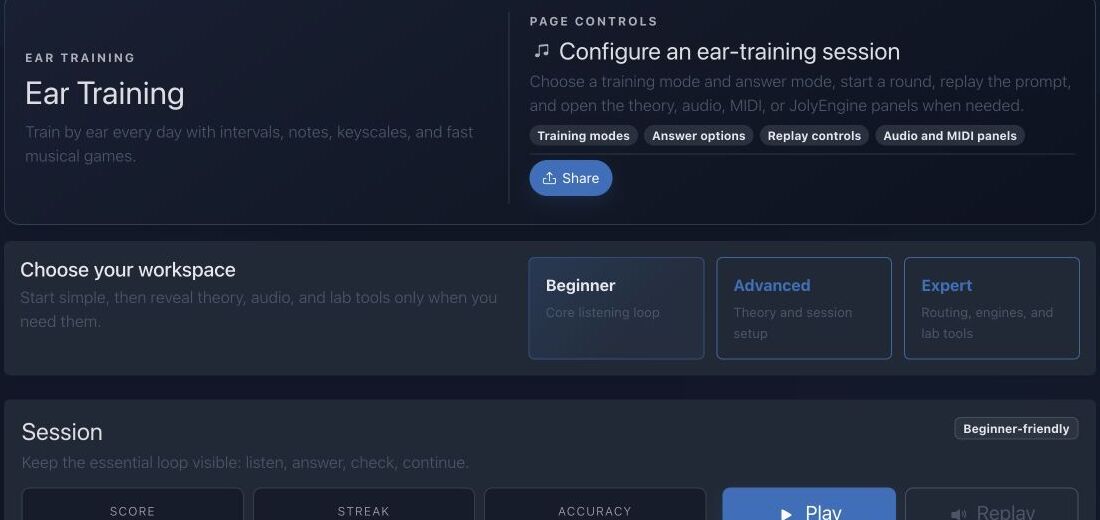
- Workspace cards select beginner, advanced, or expert scope.
- Training mode changes the listening task while preserving a consistent session.
- Session controls manage play, replay, reveal, and next actions.
- Score, streak, and accuracy separate persistence from actual recognition quality.
Step-by-step workflow
- Choose one exercise such as note dictation, chord memory, lick recognition, or a musical game.
- Read the theory panel and understand exactly what the exercise is testing.
- Complete a short set without changing difficulty after every mistake.
- Review recurring errors, sing the answer, and repeat the set on another day.
Practice tips
- Use a reference tone only when the exercise allows it.
- Accuracy at a calm pace should come before speed.
Worked example
Example: recognize major and minor thirds
Limit the session to two interval qualities. Hear the prompt once, sing the upper tone, answer, and only then replay. After ten trials, isolate the direction or register that produces most errors and repeat tomorrow.
Canonical project documentation
This reference is generated directly from repository Markdown; it is not duplicated fixture copy.
Source: Documentation/EarTraining.md
Exercise Modes
Melodic
Tones are heard in sequence. A question can move upward or downward when descending intervals are enabled. The answer normally identifies an interval unless a tone-answer mode is explicitly selected.
Harmonic
Tones are heard together. Timing is simultaneous at the question level, while the answer vocabulary remains driven by the loaded interval catalog.
Absolute
The answer identifies a tone rather than an interval. The mode service forces the answer mode to tone. The absolute picker can use a selected instrument and row layout so the learner answers on a physical representation.
The frontend is authoritative for exact question construction. New backend code must not assume every session uses the same answer type.
Question Lifecycle
The frontend controller performs:
- load interval definitions;
- load authenticated long-term stats when available;
- render answer controls;
- generate the next valid question;
- route playback through JolyEngine;
- evaluate or reveal the answer;
- update score, streak, and accuracy;
- queue session persistence for authenticated users;
- save with a beacon during page exit when possible.
The current question is retained for replay. next() clears old feedback and button states before generating another candidate.
The audio call is abortable. Disconnecting the controller cancels active playback and queued transitions to avoid stale sounds after navigation.
Session Persistence API
Save or Update a Session
POST /api/me/ear-training/session
route: api_me_ear_training_session_create
Requirements:
- fully authenticated user;
SubscriptionAccessVoter::WRITE;- JSON object body.
Accepted fields:
{
  "sessionKey": "client-stable-id",
  "score": 120,
  "correct": 8,
  "total": 10,
  "streak": 4,
  "durationMs": 90000,
  "mode": "melodic",
  "answerMode": "interval",
  "keyId": 1,
  "scaleId": 2,
  "rootMidi": 60
}
All integer counters are clamped to zero or greater. Accuracy is computed by the server:
accuracy = total > 0
    ? round(correct / total * 100)
    : 0
The server does not trust a client-supplied accuracy.
If sessionKey is empty, the server creates 16 random bytes and hex-encodes them. A matching (user, gameType=ear_training, sessionKey) updates the existing GameScore; otherwise a new row is persisted.
The entity's sessionKey column is globally unique. Clients should generate collision-resistant keys and reuse the same key only when updating the same logical session.
The saved payload includes:
mode
answerMode
correct
total
keyId
scaleId
rootMidi
savedAt
Existing payload keys are retained unless overwritten by these current values.
Read Aggregate Statistics
GET /api/me/ear-training/stats
route: api_me_ear_training_stats
Anonymous response:
{
  "sessions": 0,
  "total": 0,
  "correct": 0,
  "bestScore": 0
}
Authenticated response also contains:
correctAnswers
totalAnswers
accuracy
Aggregates include only:
gameType = ear_training
isCompleted = true
user = current user
Long-term accuracy is recalculated from summed correct and total answers. It is not an average of per-session percentages.
Failure and Recovery
Intervals fail to load
The controller cannot safely build questions and reports a load failure. Verify /api/intervals and frontend import loading.
No valid question
Relax one constraint: KeyScale, pitch range, descending direction, or answer mode.
Playback is silent
Assign a JolyEngine receiver, unlock browser audio, and verify the selected output/preset before changing theory context.
Statistics stay at zero
Confirm authentication, paid write access, a successful session POST, and isCompleted=true.
Duplicate sessions appear
The client is generating a new sessionKey for each save instead of reusing the logical session key.
Accuracy seems different from the client
The server calculates whole-number accuracy from correct / total. Long-term accuracy uses sums across all completed sessions.
Source: Documentation/mobile/MobileEarTrainingGuide.md
Circular Answer Paradigm
To maintain theoretical consistency with the Harmony Circle and Sonic Laboratory, the mobile Ear Training screens use a Radial Selection Grid.
1. The Clock-Face Answer Key
- Interval Mode: Intervals are arranged in a semi-circle or full circle (m2 at 1 o'clock, M2 at 2 o'clock, etc.).
- Tone Mode: The 12 chromatic pitch classes are arranged according to the Top-Anchor Rule (Root at 12 o'clock).
- Spatial Memory: By using a circular layout, the trainer builds the user's spatial intuition of musical distance, making it easier to transition to the Harmony explorer.
2. High-Fidelity Feedback
- Active Glow: When a question is played, the center of the circle "pulses" with the active instrument's primary color.
- Success Haptics: A double-tap haptic pulse triggers for correct answers.
- Visual Correction: If an answer is wrong, the "correct" node on the circle glows green while the user's selection fades in red, showing the distance between the two notes geometrically.
Persistence and Session Logic
Mobile sessions are tracked locally and debounced to the backend using the shared sessionKey pattern.
Aggregated Stats
GET /api/me/ear-training/stats- Stats are visualized on the Dashboard using the Concentric Activity Ring (Radial Progress).
Audio Implementation
Ear training requires sample-accurate playback:
- Immediate Trigger: Question audio must bypass the standard UI-thread delays.
- Sustained Harmony: Harmonic interval questions trigger notes simultaneously with perfect phase alignment.
Quick troubleshooting
- Everything sounds identical: reduce the answer set and sing each reference interval before testing.
- Scores improve only through replay: answer from the first hearing and use replay for review.
- Random guessing creates a streak: track accuracy over a larger session, not one short run.
Before you finish
- The exercise tests one clearly named listening skill.
- Volume and timbre stay consistent across prompts.
- Recurring mistakes are written down for the next session.
Continue in JolyMusic
Open the related tool and apply this workflow immediately to one simple example.